Skip to content

About URL to Reel

What is URL to Reel?

URL to Reel, also written UrlToReel, is a web app that makes short promo videos from a website. You paste a link, and about three minutes later you get four reels made from that page, with its headlines, photos, products, colours and fonts cut to music. You can edit them for free and post them on Instagram, TikTok, YouTube Shorts or anywhere else.

You give it
A link to any public web page
You get
Four short promo videos
It takes
About three minutes
Sizes
Vertical, feed, square and widescreen
Price
Free to make and edit, $1 or less per HD download
Account
Not needed
Made by
Masab Farooque, an independent developer

Start to finish

Watch one link become four reels

This is the app, recorded from start to finish. We sped up the part where it makes the reels. Everything else plays at normal speed.

How it works

What happens after you paste a link

Here is one run with masabfarooque.com, the site of the developer who makes URL to Reel. These are screenshots of the app, taken as it worked.

  1. Step 1

    You paste a link

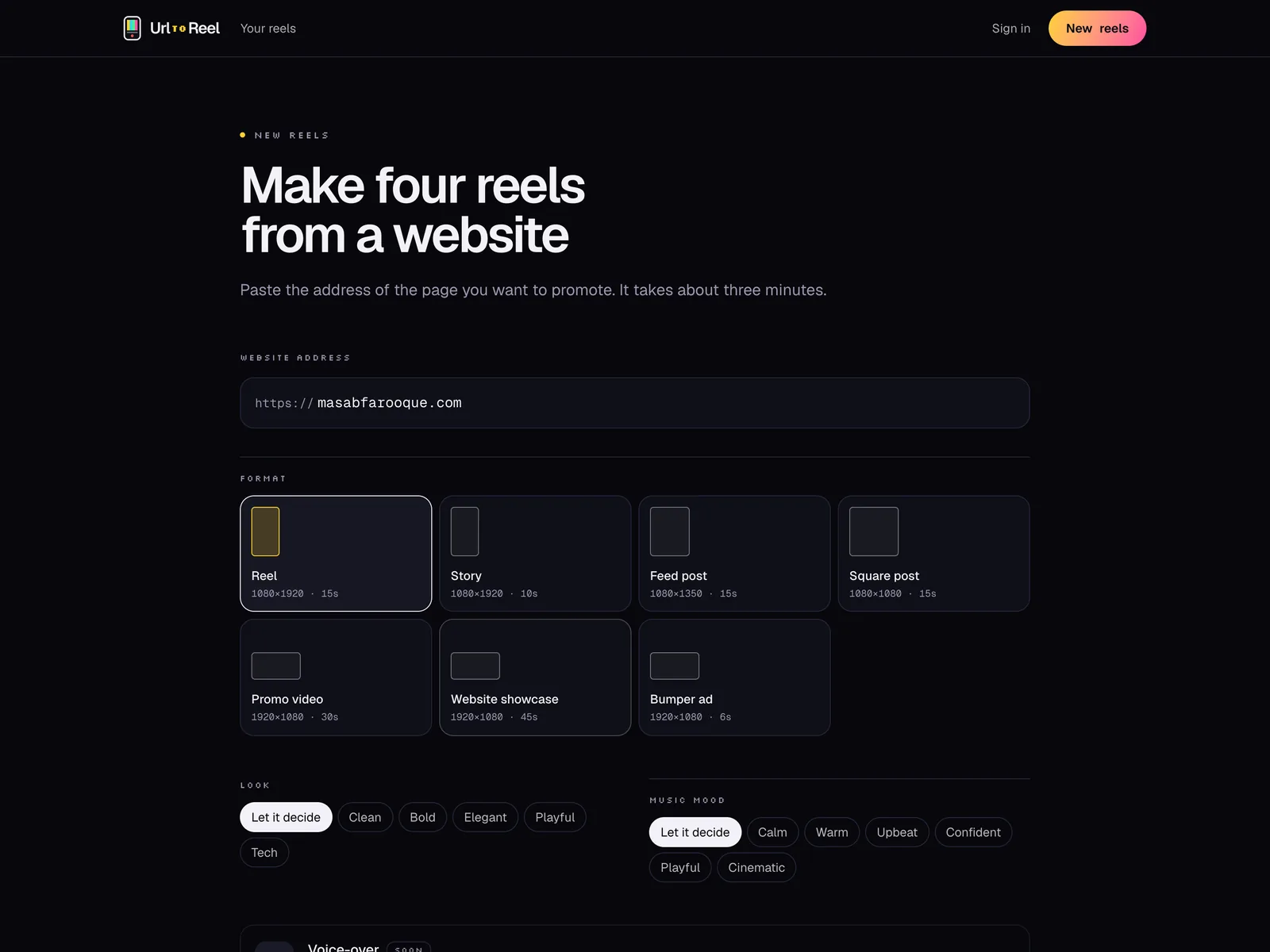
    Start with the page you want people to visit: your home page, a product page, a menu or a landing page. Pick a size, like a vertical reel or a square post. You can choose a style and a music mood too, or let the app decide.

    The new reels screen in UrlToReel with masabfarooque.com pasted in and the Reel size picked
  2. Step 2

    It visits your site

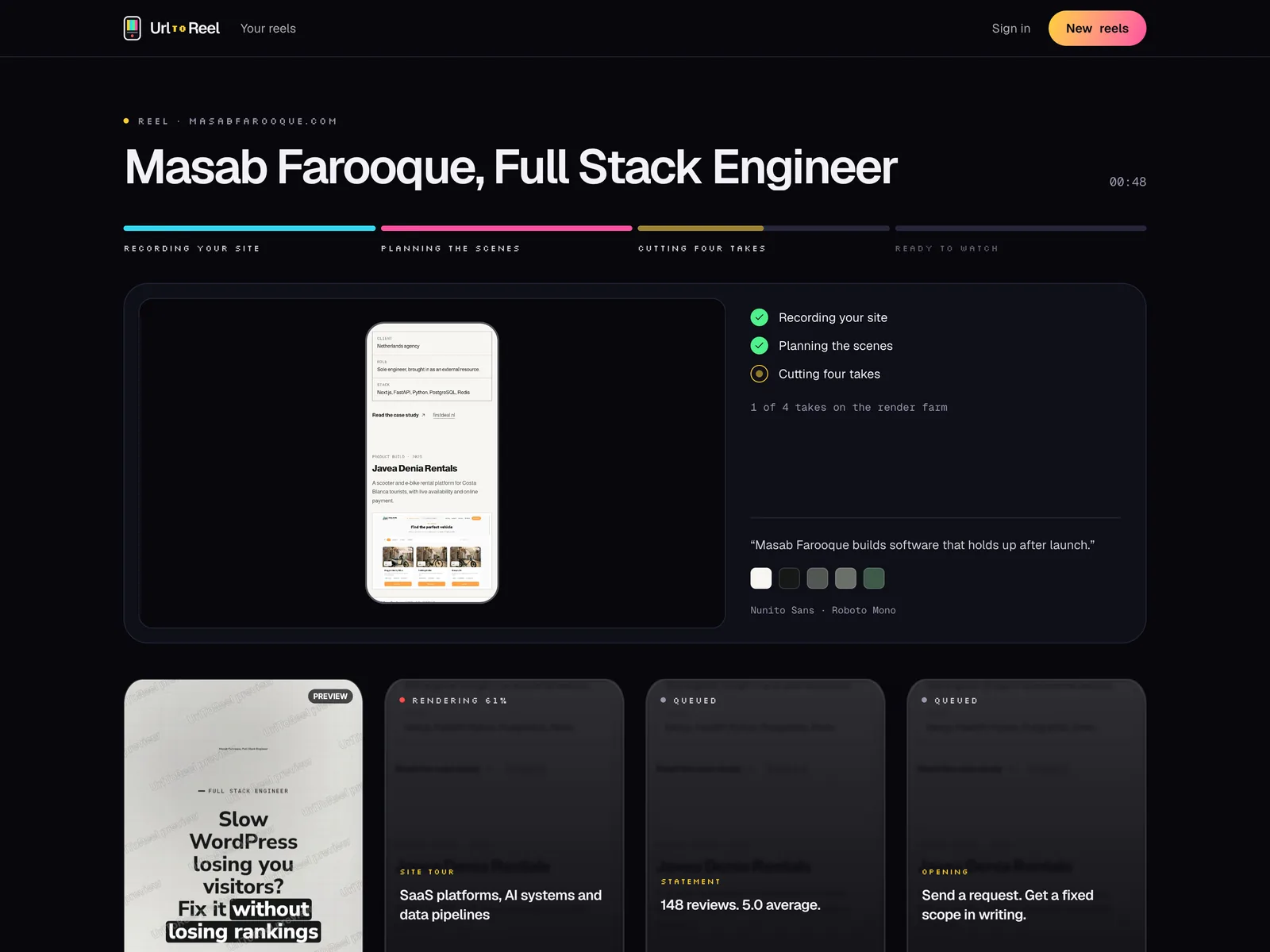
    A browser opens your page the way a visitor would and scrolls it from top to bottom. On the way it saves your logo, colours and fonts, your headlines and your photos, plus any products, prices, reviews or numbers it finds. You can watch each step on screen while it works.

    UrlToReel recording masabfarooque.com, showing the site on a phone, its colours and fonts, and four takes waiting to render
  3. Step 3

    It makes four takes

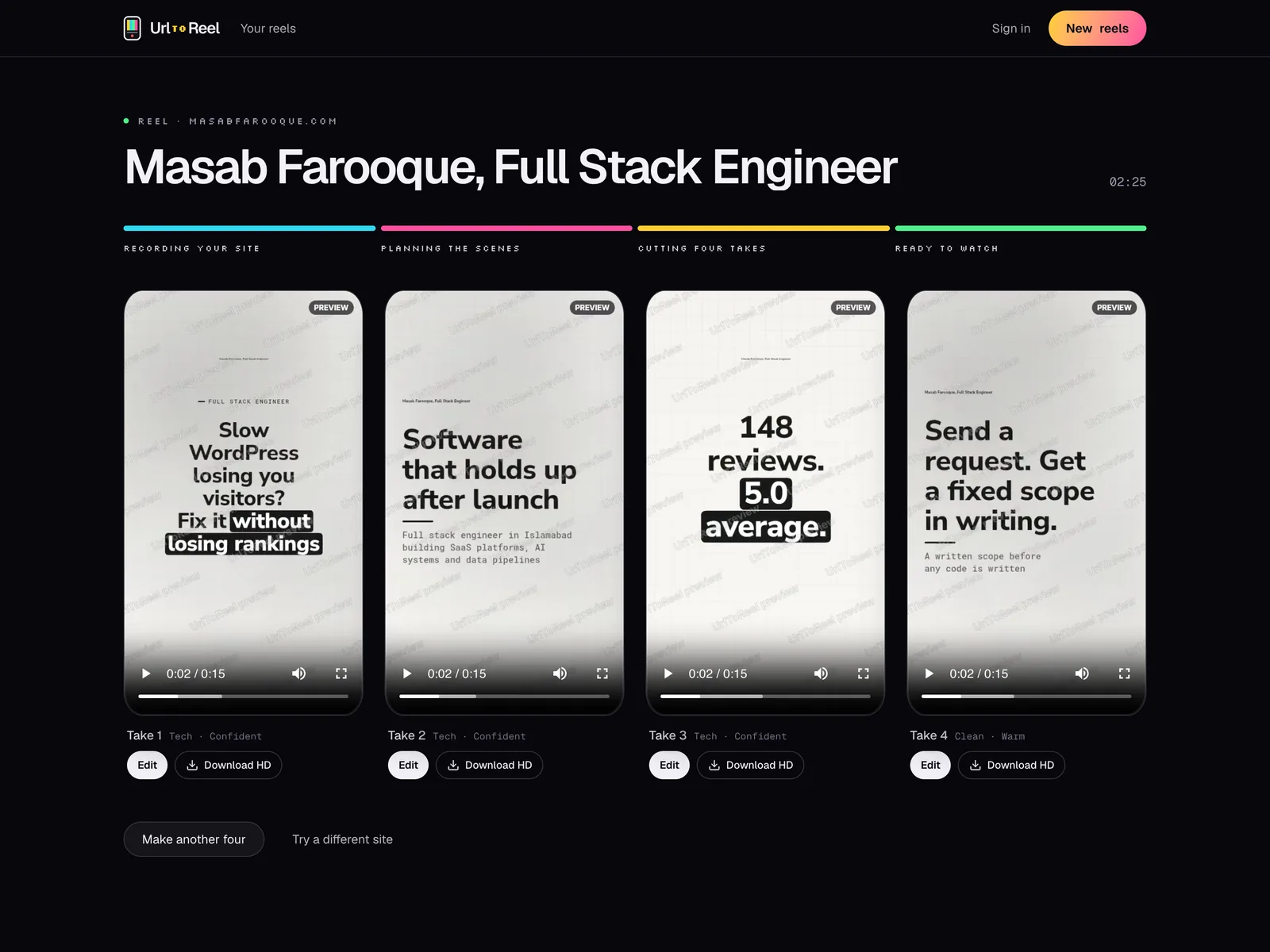
    A language model reads what was saved and plans four short videos. Each one opens a different way: a problem your customer has, the result they get, a number from your site, or your offer. Every line is checked against your page, and anything that isn't there gets dropped. Then each take gets its own scenes, pace, music and sound effects.

    Four finished takes made from masabfarooque.com, each opening on a different line
  4. Step 4

    You edit it and download it

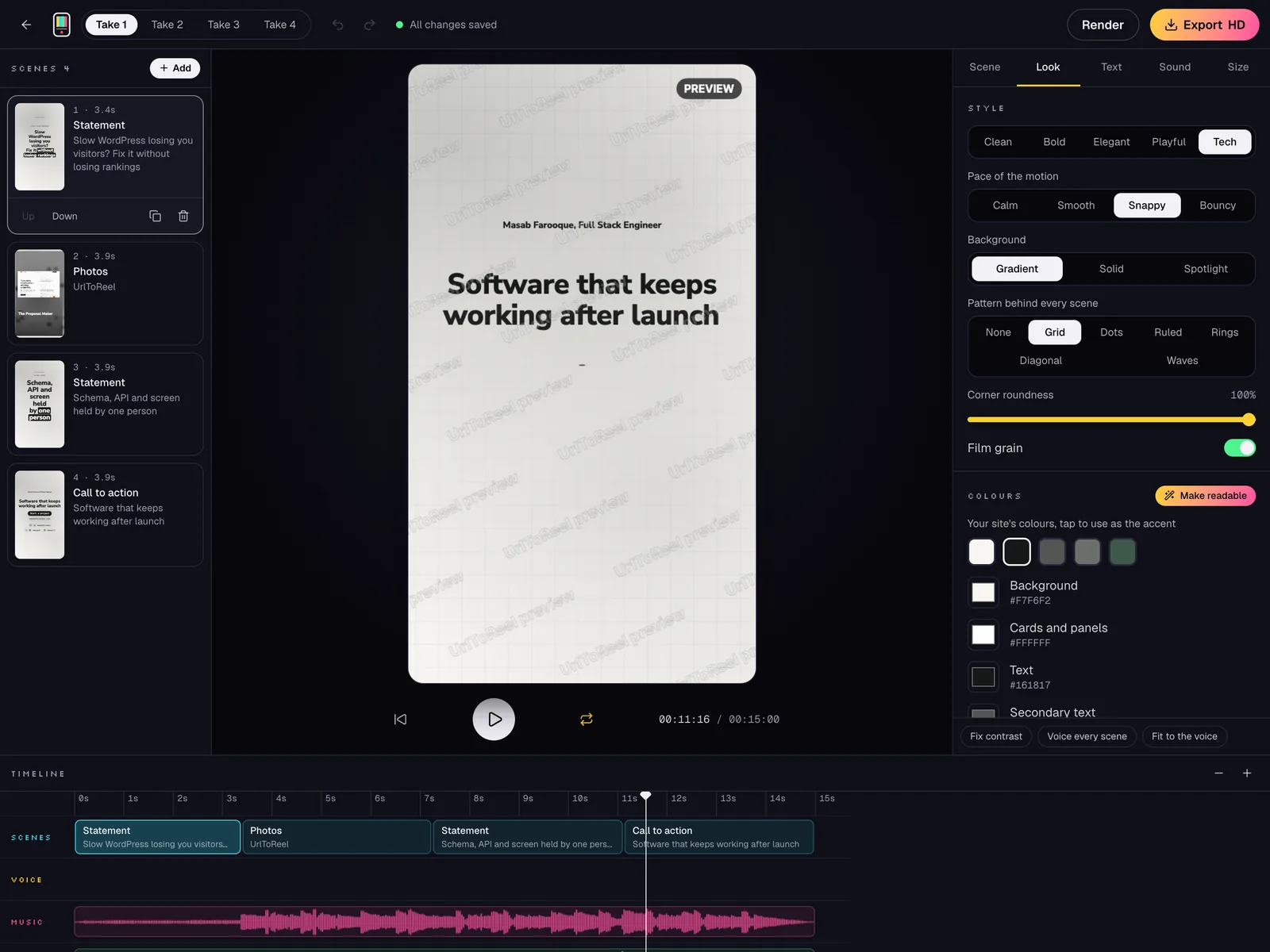
    Open any take in the editor. Change a word, a colour, the music or the order of the scenes, or record your own voice over it. Editing is free. When you're happy with a take, one credit downloads it in full HD without the watermark.

    The UrlToReel editor with the scene list, the video preview, the look settings and the timeline

Example

One link, four different reels

We pasted masabfarooque.com once. These are the four takes that came back, exactly as they came out. Each one opens a different way: a problem, a result, a number and an offer.

  • Take 1: the problemReel · Tech · 15s
  • Take 2: the resultReel · Tech · 15s
  • Take 3: the proofReel · Tech · 15s
  • Take 4: the offerReel · Clean · 15s

Hover over a reel, or scroll to it on a phone, to play it. Use the speaker button for sound.

Inside every reel

What it takes from your site, and what it leaves out

Everything in the video comes from the page you paste. That's why the reel looks like your brand, and why what people see in the video matches what they find when they tap through.

Taken from your site

  • Your logo, colours and fonts
  • Your headlines and the lines worth quoting
  • Photos of your products, food, rooms or work
  • Product names and prices
  • Ratings, reviews and other numbers
  • Your web address and a clear next step

Never in your reel

  • Stock footage
  • AI-generated video or people
  • Numbers or reviews that aren't on your page
  • Offers or prices you don't have

Clearing it up

What URL to Reel is not

Not a reel downloader

Search for "url to reel" and you'll find plenty of tools that save a reel from an Instagram link. URL to Reel does the opposite. It makes a video from your own website, so you have something new to post instead of something to save.

Not an AI video generator

It doesn't invent footage. Every frame shows your site, your photos and your words, set in moving layouts. AI only helps choose and shorten the lines, and each one is checked against your page.

Not a blank template

You don't start from an empty timeline. You start with four finished videos and change only what you want to change.

Who makes URL to Reel

URL to Reel is made and run by Masab Farooque, an independent developer. You can see more of Masab's work at masabfarooque.com. It's a standalone product, not part of an agency or a bigger company.

Most websites already have what a short video needs: the words, the photos, the colours and the prices. Turning them into a reel is the slow part, and that's the part URL to Reel does for you.

Payments go through a payment company that acts as the Merchant of Record. It handles the checkout, sales tax and receipts, and it is named on the checkout page.

Have a question, an idea or a bug to report? Send a message from the support page or email hello@urltoreel.com. We try to reply within two working days.

What it costs

Making reels and editing them is free, and you don't need an account. The previews have a small watermark.

When you want to post a reel, one credit downloads it in full HD without the watermark. Credits come in packs: 4 for $4 or 12 for $10. You pay once, there's no subscription, and credits never expire. If you change a take after you download it, downloading it again is free.

A voice-over read by a natural voice costs 2 credits for all four takes from one link. Recording your own voice is free.

UrlToReel, URL to Reel or Url To Reel?

All three are the same app. The name says what it does: you give it a URL, and it gives you a reel. We write it as UrlToReel in the logo and on social media, and as URL to Reel in sentences. The website is urltoreel.com.

Want to try it before reading more? See the URL to Reel maker or write free reel hooks from your site.

Questions

Good to know

Something else? Ask us directly

Is URL to Reel free?

Making and editing reels is free, and so is the reel hook generator. You only pay to download a reel in full HD without the watermark: 4 credits for $4 or 12 for $10, with no subscription.

Who owns URL to Reel?

Masab Farooque, an independent developer, makes and runs it. It isn't owned by an agency or a larger company.

Is URL to Reel an AI video generator?

No. It doesn't generate footage. The videos are built from your site: recordings of your pages, your photos, your words and your colours. A language model helps pick and shorten the lines, and every line is checked against your page.

Can URL to Reel download Instagram reels?

No. It doesn't download anyone's videos. It makes new videos from a website link, and you can post them on Instagram, TikTok, YouTube or anywhere else.

What happens to my site and my reels?

We open your page the way any visitor would and only read what's public. If you never sign in or buy credits, your reels are deleted after 7 days. Once you've bought credits, they stay in your account.

Which websites work best?

Pages with a clear headline and a few good photos: online stores, restaurants, salons, gyms, studios, software sites and portfolios. Pages behind a login, a paywall or a captcha can't be recorded.

Can I use the videos in ads?

Yes. The reels are yours to post anywhere, paid or organic. You need the right to use what is on the website, so stick to your own sites or sites you have permission to promote.

How do I get in touch?

Use the support page at urltoreel.com/support, or email hello@urltoreel.com.

Your website already tells the story

Paste the link and we'll cut the reel.